Best Monitor for Gaming: How to Choose Your Perfect Display
This guide contains affiliate links. As an Amazon Associate I earn from qualifying purchases, at no extra cost to you.Learn more.
Key takeaways
- Prioritize refresh rates of 480Hz or higher for competitive esports to ensure maximum motion fluidity.
- Choose 4K QD-OLED panels for a balance of high visual sharpness and deep contrast in cinematic games.
- Opt for IPS panels if you need a budget-friendly all-rounder with wide viewing angles.
- Ensure your graphics card can support the resolution and refresh rate of the monitor to avoid performance bottlenecks.
Short on time? Start with our top picks
Best overall
Asus ROG Swift PG27AQDP
- Best for
- Competitive gamers wanting top-tier OLED performance and high refresh rate
- Why choose it
- It delivers a native 480Hz refresh rate with a 0.03ms response time on a 27-inch QHD WOLED panel.
- Think twice if
- Users seeking built-in speakers should skip it, as it includes no internal speakers.
Best for esports
MSI MPG 271QR QD-OLED X50
- Best for
- Esports players seeking ultra-high-refresh QD-OLED competitive gaming
- Why choose it
- It offers an esports-grade 500Hz refresh rate paired with a 0.03ms response time and EOTF Boost mode.
- Think twice if
- Gamers who prioritize a flashy design might find its all-black chassis a bit plain.
Best for 4K gaming
MSI MPG 272URX
- Best for
- High-end 4K gamers and workstation use
- Why choose it
- It combines a 3840x2160 UHD QD-OLED panel with a 240Hz refresh rate and advanced DisplayPort 2.1a connectivity.
- Think twice if
- Users without high-end hardware capable of driving 4K at high frame rates will not fully utilize its capabilities.
Best balanced
GIGABYTE G27Q20
- Best for
- Gamers wanting a hassle-free balanced all-rounder gaming experience
- Why choose it
- It provides SuperSpeed IPS with ultra-fast response times down to 0.5ms and G-Sync compatibility.
- Think twice if
- Users looking for deep black levels found in OLED panels should look elsewhere.
Budget pick
Pixio PX248 Wave
- Best for
- Tight budgets seeking high refresh rates
- Why choose it
- It brings a 200Hz refresh rate and 1ms response time to an affordable 24-inch Fast IPS monitor.
- Think twice if
- Users needing full ergonomic flexibility should note that the original stand lacks height adjustment.
How they compare
| Product | Best for | Key specs | Think twice if | Amazon link |
|---|---|---|---|---|
| Asus ROG Swift PG27AQDP | Competitive gamers wanting top-tier OLED performance and high refresh rate | 26.5 inches QHD (2560 x 1440) · WOLED panel · 480Hz refresh rate · 0.03ms response time | Users seeking built-in speakers should skip it, as it includes no internal speakers. | Check price |
| MSI MPG 271QR QD-OLED X50 | Esports players seeking ultra-high-refresh QD-OLED competitive gaming | 27-inch WQHD (2560 x 1440) · QD-OLED panel · 500Hz refresh rate · 0.03ms response time | Gamers who prioritize a flashy design might find its all-black chassis a bit plain. | Check price |
| MSI MPG 272URX | High-end 4K gamers and workstation use | 27" UHD (3840 x 2160) · QD-OLED panel · 240Hz refresh rate · 0.03ms response time | Users without high-end hardware capable of driving 4K at high frame rates will not fully utilize its capabilities. | Check price |
| GIGABYTE G27Q20 | Gamers wanting a hassle-free balanced all-rounder gaming experience | SuperSpeed IPS panel · 0.5ms response time · G-Sync Compatible · FreeSync Premium | Users looking for deep black levels found in OLED panels should look elsewhere. | Check price |
| Pixio PX248 Wave | Tight budgets seeking high refresh rates | 24-inch Fast IPS · 1920×1080 resolution · 200Hz refresh rate · 1ms GTG response time | Users needing full ergonomic flexibility should note that the original stand lacks height adjustment. | Check price |
Specs come from manufacturer pages and the sources listed at the end. Prices change often, so we link to Amazon instead of listing them.
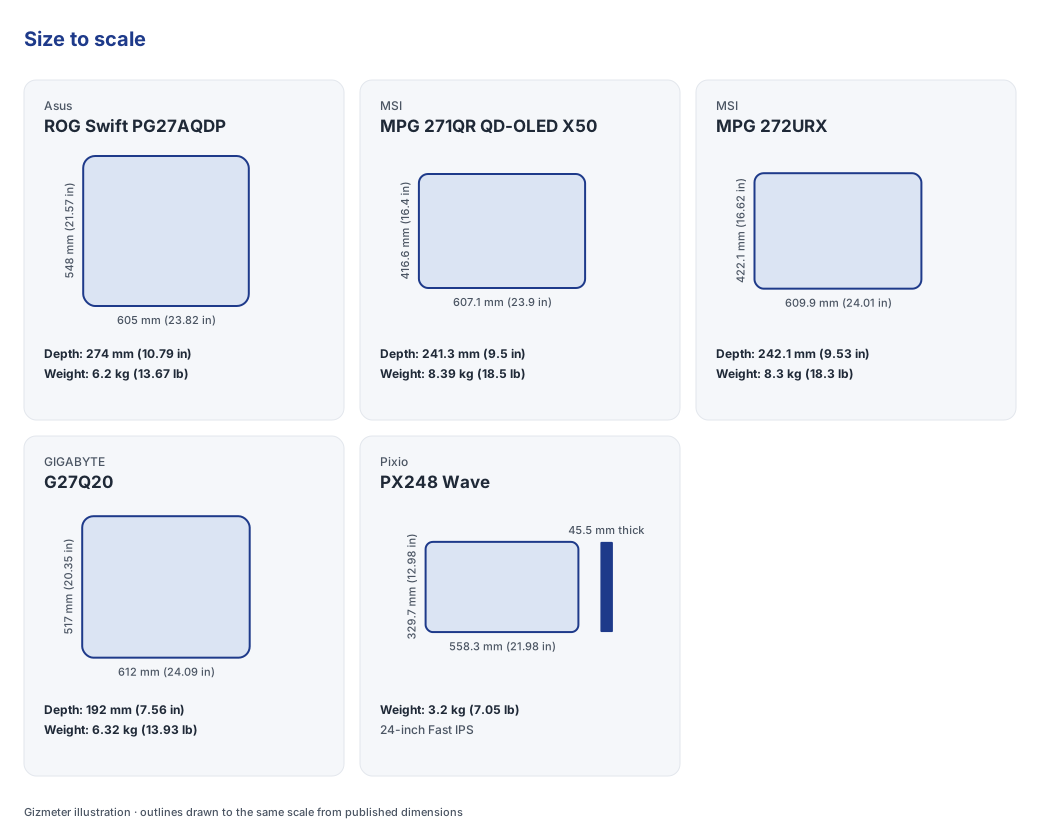
Choosing the best monitor for gaming depends on balancing display resolution, panel technology, and refresh rate against your graphics processor’s capabilities. For high-speed esports, fast displays like the Asus ROG Swift PG27AQDP or MSI MPG 271QR QD-OLED X50 provide ultra-high refresh rates, while setups like the MSI MPG 272URX prioritize 4K image sharpness for visually rich games. As of November 2026, for the US market, display panels continue to advance across IPS and OLED technologies with high refresh rate capabilities.
Asus ROG Swift PG27AQDP: best for high-refresh competitive esports
The Asus ROG Swift PG27AQDP targets competitive esports players who prioritize rapid frame delivery on a 26.5-inch QHD display.
Asus rates the ROG Swift PG27AQDP with a native 480Hz refresh rate—the frequency at which a display updates its rendered image per second—and a 0.03ms pixel response time on its WOLED (white organic light-emitting diode) panel (Back2Gaming). According to Asus specifications, it measures 60.50 x 54.80 x 27.40 cm with its stand and weighs 6.2 kg (Back2Gaming). Port options feature DisplayPort 1.4 and HDMI 2.1, and Asus backs the panel with 3-year burn-in warranty coverage. Note that it lacks built-in speakers, so an external headset or speaker setup is necessary.
The edge: This display fits players focused on competitive games who want motion fluidity at 480Hz, though users who require built-in audio or lower price points should look elsewhere.
MSI MPG 271QR QD-OLED X50: best for ultra-fast esports
The MSI MPG 271QR QD-OLED X50 is designed for competitive gamers seeking maximum refresh rates on a 27-inch 1440p QD-OLED screen.
MSI equips the MPG 271QR QD-OLED X50 with a WQHD (2560 x 1440) quantum-dot OLED panel, featuring an esports-focused 500Hz refresh rate and a 0.03ms response time (MSI). PCMag notes its dimensions with stand are 16.4 by 23.9 by 9.5 inches with a weight of 18.5 lbs (PCMag). It includes an EOTF Boost mode for extended contrast dynamics and a USB-C port supporting 98W power delivery. The outer shell uses an understated all-black design, and it does not include internal speakers.
The edge: Select this model if your priority is pushing competitive motion clarity up to 500Hz with single-cable USB-C power delivery, provided you do not require internal speakers.
MSI MPG 272URX: best for 4K high-refresh gaming and workstation use
The MSI MPG 272URX suits high-end gamers and creators who require 4K resolution clarity paired with high refresh rates.
MSI builds the MPG 272URX around a 27-inch UHD (3840 x 2160) QD-OLED panel running at a 240Hz refresh rate with a 0.03ms response time (MSI). MSI documentation notes dimensions with stand of 24.01 x 16.62 x 9.53 inches and an overall weight of 18.30 lbs (MSI). Input ports include DisplayPort 2.1a, HDMI 2.1, and USB-C with 98W power delivery for laptop charging. Because driving 4K at 240Hz demands significant graphics processing, users with modest graphics hardware will struggle to reach its refresh potential.
The edge: This option favors gamers with high-tier graphics cards wanting sharp 4K detail for gaming and productivity, whereas lower-tier hardware owners should opt for lower resolutions.
GIGABYTE G27Q20: best balanced all-rounder on an IPS budget
The GIGABYTE G27Q20 serves gamers looking for a balanced IPS screen that combines fast response times with ergonomic adjustments.
GIGABYTE equips the G27Q20 with a SuperSpeed IPS (in-plane switching, a panel type offering wide viewing angles and consistent color) panel alongside G-Sync Compatible and FreeSync Premium certifications (GIGABYTE). GIGABYTE lists its dimensions with stand as 612 x 517 x 192 mm (612 x 371 x 59 mm without stand) and net weight with stand as 6.32 kg (4.55 kg without stand) (GIGABYTE). It features Aim Stabilizer Sync to minimize blur during quick movement and an ergonomic stand with height and tilt tweaks. It does not provide the pitch-black contrast found in OLED alternatives.
The edge: The G27Q20 fits players wanting a dependable 1440p IPS display with height adjustment, while buyers wanting deep black levels will prefer OLED technology.
Pixio PX248 Wave: best budget entry for high refresh rates
The Pixio PX248 Wave offers budget-focused players an accessible entry point to 200Hz high-refresh gaming on a compact 24-inch panel.
Pixio constructs the PX248 Wave using a 24-inch Full HD (1920x1080) Fast IPS panel rated for a 200Hz refresh rate and a 1ms gray-to-gray (GTG) response time (Pixio). Pixio specification sheets state dimensions with stand of 21.3 x 16.6 x 7.5 inches and a weight of 7.01 lbs (Pixio). It supports Adaptive Sync to align frame output with your graphics card and features a compact footprint. Its factory stand lacks height adjustment, and port options are basic.
The edge: Select the PX248 Wave if you need high refresh rates on a strict budget for 1080p titles, though users requiring height adjustments will need a separate VESA arm.
Should You Prioritize Resolution or Refresh Rate?
Balancing resolution against refresh rate depends on whether your focus leans toward sharp visual detail or frame fluidity across models like the Pixio PX248 Wave, GIGABYTE G27Q20, and MSI MPG 272URX.
Resolution determines visual sharpness and image clarity. Operating at 1080p (FHD) reduces load on your graphics card, making it easier to sustain high frame rates on modest hardware, as seen on the 200Hz Pixio PX248 Wave. Moving to 1440p (QHD) acts as a middle ground, adding resolution clarity while maintaining manageable GPU frame demands. Upgrading to 4K (UHD), such as the 3840x2160 panel on the MSI MPG 272URX, yields fine details for immersive single-player games and workstation apps, but it requires high-end graphics processing. Pairing a 4K display with modest graphics hardware can lead to low frame rates.
Refresh rate governs motion smoothness. For general gaming, refresh rates between 144Hz and 200Hz provide fluid visuals. Competitive esports players often target 240Hz, 480Hz on the Asus ROG Swift PG27AQDP, or 500Hz on the MSI MPG 271QR QD-OLED X50 to reduce motion blur and track fast targets effectively.
Is OLED Worth the Investment Over IPS?
Evaluating OLED panel technology against traditional IPS panels comes down to comparing black levels, pixel response speeds, and long-term monitor usage patterns.
IPS (in-plane switching) panels are widely considered to provide wide viewing angles and reliable color performance at accessible price points, seen in models like the GIGABYTE G27Q20 and Pixio PX248 Wave (1ms GTG response Pixio). OLED (organic light-emitting diode) and QD-OLED (quantum-dot OLED) panels, featured on the MSI MPG 272URX, MSI MPG 271QR QD-OLED X50, and Asus ROG Swift PG27AQDP, achieve infinite contrast ratios and near-instant response times of 0.03ms. Fast-paced multiplayer shooters benefit directly from this speed, as individual pixel transitions happen without noticeable trailing.
For productivity users who leave static graphics or taskbars on screen for extended work sessions, panel longevity and image retention (burn-in) warrant attention. Manufacturers address this through thermal designs and warranty coverage, such as the 3-year burn-in warranty included with the Asus ROG Swift PG27AQDP.
How Do You Balance Gaming Needs with Productivity?
Combining work tasks with fast-paced gaming requires selecting displays that pair clear color delivery with versatile laptop connectivity and ergonomic screen layouts.
High-refresh monitors with accurate color output can serve dual roles for content editing and high-frame-rate gaming. Displays running at 1440p or 4K offer enough screen real estate to view multiple windows side by side during work hours.
Connectivity features simplify hybrid setups. Monitors with USB-C ports that supply power delivery—such as the 98W PD capabilities on both the MSI MPG 271QR QD-OLED X50 and MSI MPG 272URX—allow a connected laptop to output video while receiving charge over a single cable.
Are Curved Monitors or Flat Panels Better for Your Setup?
Deciding between flat panels and curved displays involves matching screen geometry to your favorite game genres, desk space, and viewing distance.
Flat panels, such as the Asus ROG Swift PG27AQDP, MSI MPG 271QR QD-OLED X50, MSI MPG 272URX, GIGABYTE G27Q20, and Pixio PX248 Wave, are standard choices for competitive esports and graphic design, where consistent straight-line geometry matters. Curved screens pull peripheral view inward to increase immersion in single-player titles, but selecting an improper curve radius relative to desk depth can lead to distorted viewing angles.
Avoid common setup mistakes when setting up a display. Ensure your desk has sufficient physical space or VESA arm support before buying larger displays. Check connection specifications, as achieving high refresh rates at 4K or 1440p requires appropriate ports like HDMI 2.1 (necessary for consoles like PS5) or DisplayPort 1.4 and DisplayPort 2.1a on modern graphics cards. Finally, remember to manually enable high refresh rates in operating system display settings after initial setup.
Bottom line
Finding the best monitor for gaming comes down to matching your graphics card and playstyle to the right combination of refresh rate, resolution, and panel technology.
- Esports competitors seeking peak motion smoothness should choose between the 480Hz Asus ROG Swift PG27AQDP and the 500Hz MSI MPG 271QR QD-OLED X50.
- High-end gamers needing 4K resolution alongside high frame rates and single-cable USB-C docking will benefit from the MSI MPG 272URX.
- Gamers wanting a balanced 1440p IPS setup with ergonomic adjustments will find strong overall utility in the GIGABYTE G27Q20.
- Players working within strict budget limits can access 200Hz frame rates with the compact Pixio PX248 Wave.
Related reading
Frequently asked questions
What is the best gaming monitor for 1440p?
For 1440p gaming, top choices depend on your budget and refresh rate targets. High-end OLED options like the 480Hz Asus ROG Swift PG27AQDP and 500Hz MSI MPG 271QR QD-OLED X50 deliver instant pixel response times, while the GIGABYTE G27Q20 provides a balanced IPS alternative at a lower cost.
Is OLED better than IPS for gaming?
OLED and QD-OLED panels offer deeper blacks, infinite contrast, and near-instant response times down to 0.03ms compared to IPS panels. However, IPS panels remain strong choices for buyers seeking reliable color delivery and fast motion performance without the higher cost or burn-in concerns associated with OLED technology.
Do I need a 240Hz monitor for gaming?
A 240Hz or higher monitor is primarily beneficial for competitive esports players who need maximum motion fluidity and low input lag in fast-paced titles. For casual or general single-player gaming, refresh rates between 144Hz and 200Hz provide smooth visuals without demanding extreme frame rates from your graphics card.
What monitor resolution should I get for my graphics card?
Select 1080p for entry-level or modest graphics cards to maintain high frame rates effortlessly. Step up to 1440p for the optimal balance of image sharpness and graphics performance, or reserve 4K displays for top-tier graphics hardware capable of rendering dense visuals at high frame rates.
Are curved monitors better for gaming?
Curved monitors increase immersion in simulation and single-player games by wrapping the display edges into your visual field. Flat panels remain preferred for competitive multiplayer shooters and visual work where straight geometry and distortion-free viewing angles are essential.
What response time is best for competitive gaming?
Competitive gaming benefits from response times of 1ms GTG or lower to prevent motion blur and ghosting. Modern OLED panels reach 0.03ms response times, while fast IPS panels like the GIGABYTE G27Q20 achieve response speeds down to 0.5ms.
How we researched this guide
How we chose these products. We compared current models sold in the US on:
- Refresh Rate
- Resolution
- Panel Technology
Where the information comes from.
- Manufacturer data: specifications and weights come from official product pages, checked on .
- Third-party sources: other facts are linked to the 16 sources listed below.
- Our analysis: who each product suits, its trade-offs and our recommendations are editorial judgments based on that information.
Limitations. We did not test these products hands-on, and configurations, availability and prices change often, so confirm the exact configuration on the retailer's page before buying. AI tools helped research and draft this guide, and an editor reviewed it before publishing.Read our editorial process.
Sources
- G27Q20 Gaming Monitor Specifications - GIGABYTE Global
- ASUS ROG Swift PG27AQDP 27" 1440p 480Hz OLED Monitor - Back2Gaming
- MPG 271QR QD-OLED X50
- MSI MPG 272URX QD-OLED 27" UHD 240Hz Flat Gaming Monitor - MSI-US Official Store
- Pixio PX248 Wave | 24 inch 1080p 200Hz 1ms (GTG) FAST IPS Gaming Monitor
- MSI MPG 271QR QD-OLED X50 27" QHD 500Hz Flat Gaming Monitor - MSI-US Official Store
- MPG 272URX QD-OLED - MSI
- G27Q20 Gaming Monitor - GIGABYTE United States
- Pixio PX248 Wave | 24 inch 1080p 200Hz 1ms (GTG) FAST IPS ...
- Pixio PX248 Wave review: A monitor for fashion, flair, and clarity on a budget | PCWorld
- Asus ROG Swift PG27AQDP OLED 480 Hz gaming monitor review: Raising the bar | Tom's Hardware
- MSI MPG 271QR QD-OLED X50 review: Two-fer monitor pairs 500Hz with USB-C | PCWorld
- MSI MPG 271QR QD-OLED X50 Review: A Killer Esports Monitor With a Dose of AI
- MSI MPG 271QR QD-OLED X50 - Review 2026 - PCMag UK
- MSI MPG 271QR QD-OLED X50 Review 2026 - Display Ninja
- 23.8" Pixio PX248 Wave - Specifications - DisplaySpecifications