Dell XPS 13 vs MacBook Air M5: Which Ultraportable to Buy?
Laptops comparison
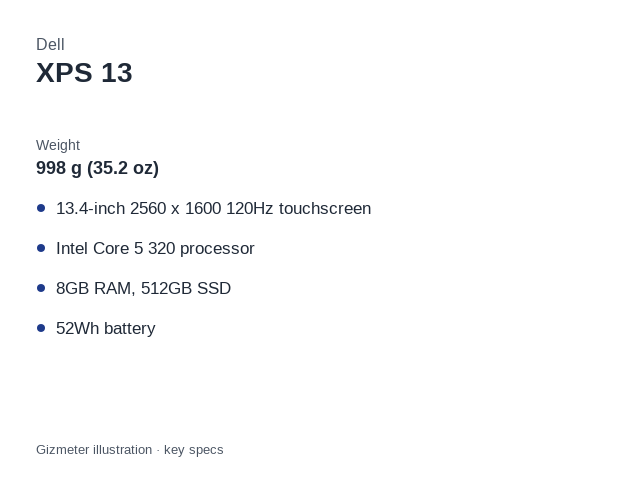
DellXPS 13
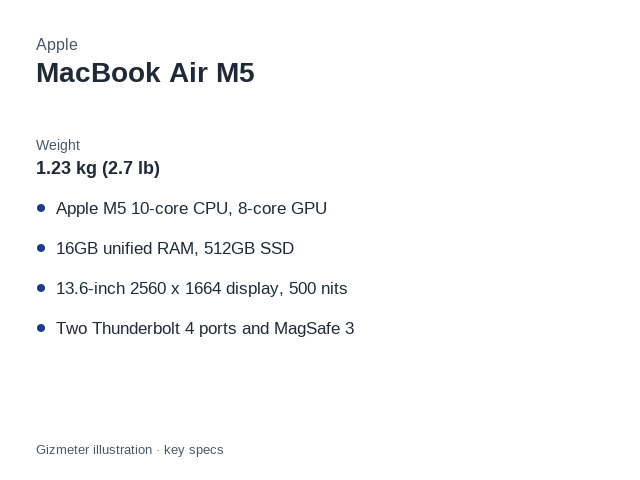
AppleMacBook Air M5
This guide contains affiliate links. As an Amazon Associate I earn from qualifying purchases, at no extra cost to you.Learn more.
Key takeaways
- Choose the MacBook Air M5 for 16GB of memory as standard, double the 8GB of the base Dell XPS 13.
- Choose the Dell XPS 13 if you want a touchscreen with a 120Hz refresh rate.
- The Dell XPS 13 is the lighter laptop, at 2.2 pounds against 2.7 pounds for the MacBook Air M5.
- Battery life is close: Dell claims up to 17 hours for the XPS 13, and Apple rates the MacBook Air M5 for 15 to 18 hours.
Short on time? Start with our top picks
Best for Windows users
Dell XPS 13
- Best for
- Windows users who want the lightest laptop here and a 120Hz touchscreen.
- Why choose it
- It has a 120Hz 2.5K touchscreen and weighs 2.2 pounds.
- Think twice if
- The base model comes with only 8GB of RAM that cannot be upgraded later, and Engadget found its Core 5 320 chip significantly slower than the previous XPS 13.
Best for Apple ecosystem users
Apple MacBook Air M5
- Best for
- iPhone and iPad owners who want more memory out of the box, two external displays and macOS.
- Why choose it
- It pairs a 10-core Apple M5 with 16GB of unified memory as standard, and drives up to two 6K external displays.
- Think twice if
- Neither the RAM nor the SSD can be upgraded later, it has no touchscreen, and it is half a pound heavier than the XPS 13.
How they compare
| Product | Best for | Key specs | Think twice if | Amazon link |
|---|---|---|---|---|
| Dell XPS 13 | Windows users who want the lightest laptop here and a 120Hz touchscreen. | 13.4-inch 2560 x 1600 120Hz touchscreen · Intel Core 5 320 processor · 8GB RAM, 512GB SSD · 52Wh battery | The base model comes with only 8GB of RAM that cannot be upgraded later, and Engadget found its Core 5 320 chip significantly slower than the previous XPS 13. | Check price |
| Apple MacBook Air M5 | iPhone and iPad owners who want more memory out of the box, two external displays and macOS. | Apple M5 10-core CPU, 8-core GPU · 16GB unified RAM, 512GB SSD · 13.6-inch 2560 x 1664 display, 500 nits · Two Thunderbolt 4 ports and MagSafe 3 | Neither the RAM nor the SSD can be upgraded later, it has no touchscreen, and it is half a pound heavier than the XPS 13. | Check price |
Specs come from manufacturer pages and the sources listed at the end. Prices change often, so we link to Amazon instead of listing them.
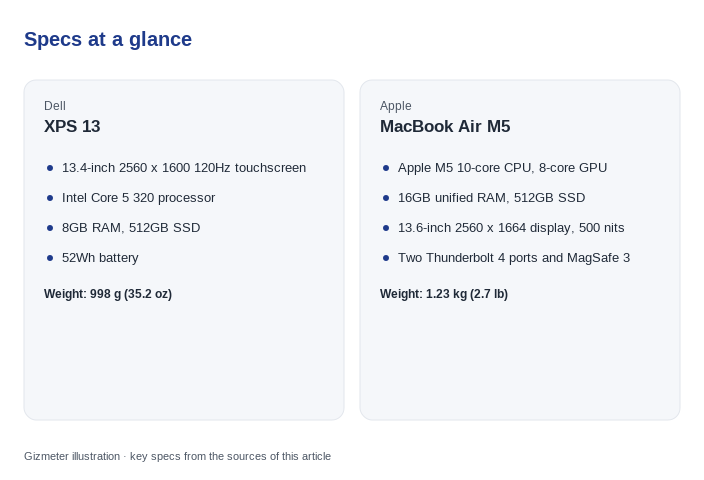
Buy the MacBook Air M5 if you use an iPhone or iPad, keep many apps open or want two external monitors: it starts with 16GB of memory, double the base Dell XPS 13. Buy the Dell XPS 13 if you prefer Windows 11 and want the lighter 2.2-pound laptop with a 120Hz touchscreen.
Which has better performance, the MacBook Air M5 or Dell XPS 13?
As of November 2026, for the US models, the MacBook Air M5 has a 10-core Apple M5 processor (four performance and six efficiency cores), an 8-core GPU and 16GB of unified memory as standard, a single pool of memory shared by the processor and graphics (EveryMac). The entry-level Dell XPS 13 uses an Intel Core 5 320 with 8GB of memory, and 16GB costs extra (Engadget).
Engadget found the Core 5 320 significantly slower than the previous generation of XPS 13 and said the base model needs more RAM (Engadget). For documents, web apps and video calls, 8GB is workable; if you edit photos or video, compile code or keep dozens of browser tabs open, the MacBook Air’s 16GB gives you more headroom without paying for an upgrade. Memory cannot be added later on either laptop, so the amount you buy is the amount you keep.
The edge: The MacBook Air M5 has more headroom out of the box, with a 10-core M5 and twice the base memory of the Dell XPS 13.
Which laptop lasts longer, the Dell XPS 13 or MacBook Air M5?
Dell fits the XPS 13 with a 52Wh battery and claims up to 17 hours of use (How-To Geek). In Engadget’s testing it lasted 15 hours and 56 minutes in PCMark 10’s Modern Office battery benchmark (Engadget). Apple rates the MacBook Air M5, with its 53.8Wh battery, for up to 15 hours of wireless web browsing and up to 18 hours of video streaming (EveryMac).
Both batteries are close in size and both laptops last a full workday away from an outlet, so battery life alone should not decide between them.
The edge: Battery life is a tie for practical purposes; pick on platform, weight and memory instead.
Which display is better: Dell XPS 13 or MacBook Air M5?
Dell builds the XPS 13 with a 13.4-inch 2560 x 1600 touchscreen, up to 500 nits of brightness and a refresh rate that varies from 30 to 120Hz (How-To Geek). Refresh rate is how many times per second the screen redraws its image: 120Hz makes scrolling and motion look smoother, and dropping to lower rates on static content saves power.
The MacBook Air M5 has a slightly larger 13.6-inch Liquid Retina display at 2560 x 1664 and 500 nits (EveryMac). It does not support touch, and its specifications list no high refresh rate.
The edge: The Dell XPS 13 has the more versatile screen, with touch and 120Hz; the MacBook Air M5 gives you slightly more vertical space at the same brightness.
Which is more portable, the Dell XPS 13 or MacBook Air M5?
The Dell XPS 13 starts at 2.2 pounds (1 kg) and is 12.7 mm thick (How-To Geek). The MacBook Air M5 weighs 2.7 pounds (1.23 kg) and measures 0.44 x 11.97 x 8.46 inches (EveryMac).
Both slide into thin sleeves and fit on airplane tray tables, but half a pound is noticeable if you carry the laptop all day.
The edge: The Dell XPS 13 is the lighter laptop to carry.
Which has better ports and connectivity, the Dell XPS 13 or MacBook Air M5?
The Core 5 Dell XPS 13 has two USB-C 3.2 Gen 2 ports, and both support DisplayPort output and charging (How-To Geek). It has no headphone jack (Engadget).
The MacBook Air M5 has two Thunderbolt 4 / USB 4 ports, a MagSafe 3 charging port that keeps both data ports free while charging, and a 3.5 mm headphone jack. It can drive up to two 6K external displays at 60Hz and comes with a 40W Dynamic Power Adapter (EveryMac). Neither laptop has USB-A or a card reader, so older thumb drives and SD cards need an adapter.
The edge: The MacBook Air M5 has the more complete port set, with faster Thunderbolt ports, MagSafe and a headphone jack.
Windows 11 or macOS: Which ecosystem fits your workflow?
The Dell XPS 13 runs Windows 11, which supports enterprise management tools, engineering software and the widest range of Windows apps and hardware drivers (How-To Geek).
The MacBook Air M5 runs macOS, which works best alongside an iPhone or iPad: AirDrop file sharing, a shared clipboard and synced messages work across Apple devices. On both laptops the memory is soldered and cannot be upgraded later (Engadget, EveryMac), so choose the memory and storage you will need for the laptop’s whole life at checkout.
The edge: Windows software users are better served by the Dell XPS 13, while iPhone and iPad owners get more from the MacBook Air M5.
Who should buy the XPS 13?
The Dell XPS 13 suits Windows users and frequent travelers who want a light laptop with a touchscreen. At 2.2 pounds it is easy to carry all day, and its 120Hz touch display makes scrolling smooth and lets you tap and zoom directly on the screen.
Configure 16GB of memory at checkout if you edit media, run virtual machines or keep many apps open: the base 8GB cannot be upgraded later.
Who should buy the MacBook Air M5?
The MacBook Air M5 is for iPhone and iPad owners and for anyone who keeps many apps open: 16GB of memory comes standard with the 10-core M5, and two Thunderbolt 4 ports drive up to two 6K monitors at a desk.
It is half a pound heavier than the XPS 13 and has no touchscreen. Its storage cannot be expanded after you buy it, so choose a larger SSD at checkout if you keep big photo or video libraries on the laptop.
Bottom line
Choose the Dell XPS 13 if you prefer Windows 11, want the lighter 2.2-pound laptop and like a 120Hz touchscreen; configure 16GB of memory if you multitask heavily.
Choose the MacBook Air M5 if you use an iPhone or iPad, want 16GB of memory without paying for an upgrade, or need two external monitors and a headphone jack.
Frequently asked questions
Does the MacBook Air M5 support multiple external displays natively?
Yes. The MacBook Air M5 can drive up to two 6K external displays at 60Hz through its Thunderbolt 4 ports. Both USB-C ports on the Core 5 Dell XPS 13 support DisplayPort output as well.
Which laptop has a better keyboard and trackpad for long typing sessions?
The MacBook Air M5 has Apple's Magic Keyboard with Touch ID and a Force Touch trackpad. Engadget describes the Dell XPS 13's keys as old-school chiclet keys with little travel, and its mechanical trackpad does not register clicks on its top third.
How do the port selections compare for connecting external drives?
The MacBook Air M5 has two Thunderbolt 4 / USB 4 ports, a MagSafe 3 charging port and a headphone jack. The Core 5 Dell XPS 13 has two USB-C 3.2 Gen 2 ports and no headphone jack, so you need an adapter or a USB-C headset for wired audio.
Which operating system is easier to transition to if I am switching platforms?
It depends on your software. Windows 11 on the Dell XPS 13 runs the widest range of business and engineering apps, while macOS on the MacBook Air M5 works best if you already use an iPhone or iPad.
How we researched this guide
How we chose these products. We compared current models sold in the US on:
- Operating System Preference
- Mobility and Endurance
- Peripheral Compatibility
Where the information comes from.
- Manufacturer data: specifications, weights and battery-life figures come from official product pages, checked on . Battery figures are the manufacturers' own ratings under their test conditions, not our measurements.
- Third-party sources: other facts are linked to the 3 sources listed below.
- Our analysis: who each product suits, its trade-offs and our recommendations are editorial judgments based on that information.
Limitations. We did not test these products hands-on, and configurations, availability and prices change often, so confirm the exact configuration on the retailer's page before buying. AI tools helped research and draft this guide, and an editor reviewed it before publishing.Read our editorial process.